Years of finished work, finally worth charting
Every task you tick off in Todoist leaves a record — when you finished it, which project it belonged to, what priority you gave it and how you labelled it. That’s a detailed log of what you actually did, accumulated as a side effect of just using the app.
DayDash brings it across as time-series data and puts it next to everything else you track, so your throughput sits on the same timeline as your sleep, your focused hours and your calendar.
What comes across
Two things. The completed-task stream is one record per completion, carrying its project, priority, labels and section, plus when the task was originally added and when it was due. Those last two are what let you ask about on-time rate and about how long work sat before you got to it.
Karma and daily stats is the daily view — how many tasks you completed each day and where your Karma score stood.
Worth knowing how the two relate: completing a recurring task in Todoist advances its due date rather than closing it out, so recurring work shows up in the daily Karma counts rather than in the task-level stream. If you want total throughput, that’s the number to chart; if you want the breakdown by project or label, that’s the other one. They’re answering different questions, and they’re allowed to disagree.
Questions people explore with this
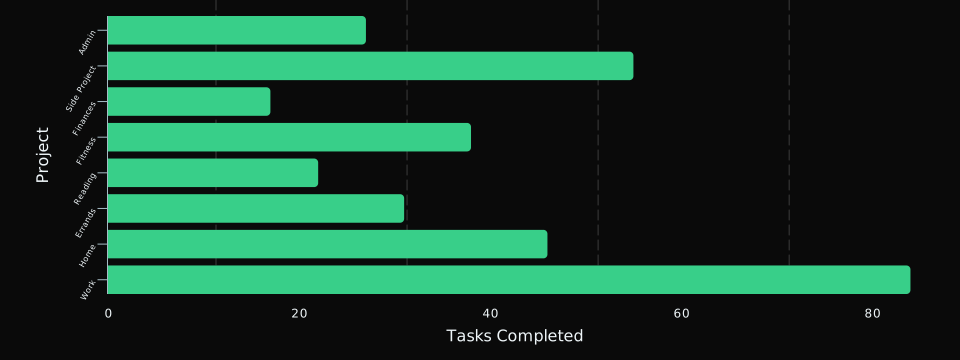
- Which projects actually absorb my week, as opposed to which ones feel like they do?
- How long does work sit in my inbox before I get to it?
- What share of my tasks land on or before their due date, month over month?
- How does my completed-task count move alongside my focused hours?
Read-only
DayDash reads your completed history and your stats. It does not create tasks, complete them, reschedule them, or change your projects — nothing in DayDash writes back to Todoist.