Apple Health Logo

Build your own Apple Health dashboard

Steps, heart rate, sleep, and workouts — straight off your iPhone and Apple Watch.

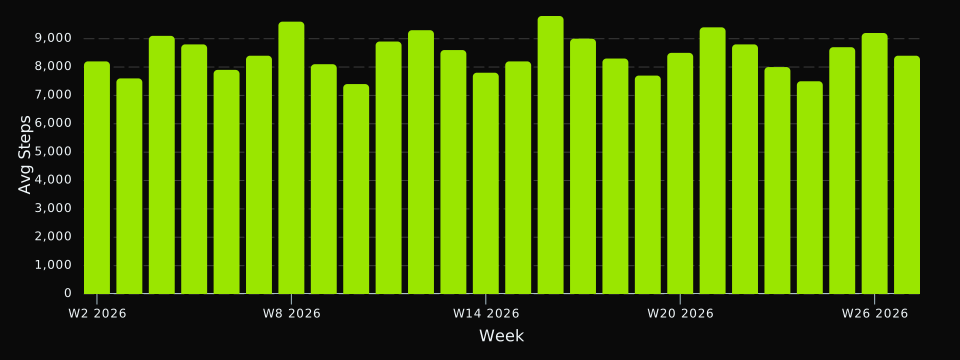
Steps by week
An example DayDash chart of Apple Health data, showing steps by week

Example chart rendered in DayDash. Sample data shown for illustration.

The richest record of your body you already own

Apple Health is where an iPhone and an Apple Watch quietly accumulate one of the most detailed records of your body most people will ever have — steps, heart rate, sleep, workouts, body composition, and a long tail of measurements written there by other apps and devices you use.

DayDash reads that record and puts it on a dashboard next to everything else you track, so you can look at your body data and the rest of your life on one timeline.

Questions people explore with this

  • How does my resting heart rate move across a training block?
  • What does my HRV look like next to bedtime, workout load, or travel weeks?
  • Has my VO2 Max changed over the past year?
  • Do my step counts follow the seasons, my calendar, or something else?

It reads on-device

Apple Health data never leaves your phone unencrypted. The DayDash iOS app reads from Apple Health locally, encrypts on the device, and syncs only ciphertext. We hold no keys to it. That matters here more than almost anywhere: this can include cycle tracking, blood glucose, and body composition, and it should not be readable by any company, including us.

You choose which of the data types below to sync. Anything you don’t select is never read.

What you get

47 kinds of Apple Health data

Pick the ones you care about. Every field becomes something you can chart, filter, and compare against everything else you track.

Activity & Fitness

Steps, exercise, energy burned, distances, and workout data

Step Count

Daily step count from Apple Health and connected devices

Active Energy Burned

Calories burned during physical activities

Walking/Running Distance

Distance walked or run as measured by iPhone and Apple Watch

VO2 Max

Maximum oxygen uptake during intense exercise

Apple Exercise Time

Exercise minutes tracked by Apple Watch

Cycling Distance

Distance covered while cycling

Flights Climbed

Number of flights of stairs climbed

Basal Energy Burned

Calories burned at rest (BMR/RMR)

Workouts

Exercise sessions with duration, type, and performance metrics

Apple Move Time

Apple Watch Move goal progress in minutes

Apple Stand Time

Apple Watch Stand goal progress in minutes

Running Speed

Running speed measurements during workouts

Swimming Distance

Distance covered while swimming

Vital Signs

Heart rate, blood pressure, temperature, and other vital measurements

Heart Rate

Heart rate measurements from Apple Watch and other devices

Oxygen Saturation

Blood oxygen saturation measurements from Apple Watch and pulse oximeters

Walking Heart Rate Average

Average heart rate while walking

Respiratory Rate

Breathing rate in breaths per minute

Body Temperature

Core body temperature measurements

Resting Heart Rate

Heart rate when at rest

Blood Pressure Systolic

Systolic blood pressure measurements

Blood Pressure Diastolic

Diastolic blood pressure measurements

Heart Rate Variability

Heart rate variability (SDNN) measurements

Blood Glucose

Blood glucose/sugar level measurements

Peripheral Perfusion Index

Blood circulation measurement from Apple Watch

Body Measurements

Weight, height, body composition, and physical measurements

Body Mass

Body weight measurements from smart scales and manual entries

Body Fat Percentage

Body fat percentage measurements from smart scales and other devices

Body Mass Index

Body Mass Index (BMI) measurements

Height

Body height measurements

Lean Body Mass

Body weight excluding fat mass

Waist Circumference

Waist circumference measurements

Nutrition & Hydration

Diet, nutrition tracking, and hydration data

Dietary Energy Consumed

Calories consumed from food and beverages

Dietary Protein

Protein intake from food and supplements

Dietary Carbohydrates

Carbohydrate intake from food and beverages

Dietary Fat

Fat intake from food and supplements

Dietary Fiber

Fiber intake from food

Dietary Water

Water and fluid intake for hydration tracking

Dietary Sugar

Sugar intake from food and beverages

Dietary Sodium

Sodium intake from food and supplements

Dietary Caffeine

Caffeine intake from coffee, tea, and other sources

Alcoholic Beverages

Number of alcoholic drinks consumed

Reproductive Health

Menstrual tracking, fertility, and reproductive health data

Menstrual Flow

Menstrual flow tracking with intensity levels

Basal Body Temperature

Basal body temperature for fertility tracking

Sleep & Mindfulness

Sleep analysis, sleep stages, and mindfulness sessions

Sleep Analysis

Sleep periods with start/end times and sleep stages

Time in Bed

Time spent in bed (not necessarily asleep)

Mindful Session

Meditation and mindfulness session tracking

Hearing Health

Audio exposure levels and hearing protection data

Environmental Audio Exposure

Environmental noise exposure levels for hearing health

Headphone Audio Exposure

Headphone volume exposure for hearing protection

How it works

1

Connect Apple Health

Install the DayDash app on your iPhone or iPad and grant it read access. Your Apple Health data is read locally on that iPhone or iPad — including anything a watch or band has already synced into it — and encrypted before it goes anywhere.

2

Pick your fields

Choose only the data types you want. Nothing you don't select is ever synced.

3

Chart anything

Build dashboards that put Apple Health next to everything else you track — spending, sleep, screen time, the weather.

Worth knowing: DayDash reads from the Apple Health app on your iPhone or iPad, not directly from an Apple Watch. Your Watch already writes into Apple Health automatically, so its data comes across too — but the phone is what DayDash talks to, and it needs to have synced recently.

Your Apple Health data stays yours

DayDash is end-to-end encrypted. Your data is encrypted on your device with keys only you hold — we can't read it, and neither can anyone who gets our database.

Read how the encryption works

Ready to see your Apple Health data?

Join the beta and lock in $5/month, forever.

DayDash is not affiliated with, endorsed by, or sponsored by Apple Health. Apple Health and related marks are trademarks of their respective owners, used here only to describe what DayDash connects to.