Oura Logo

Build your own Oura dashboard

Sleep scores, readiness, and activity from your Oura Ring.

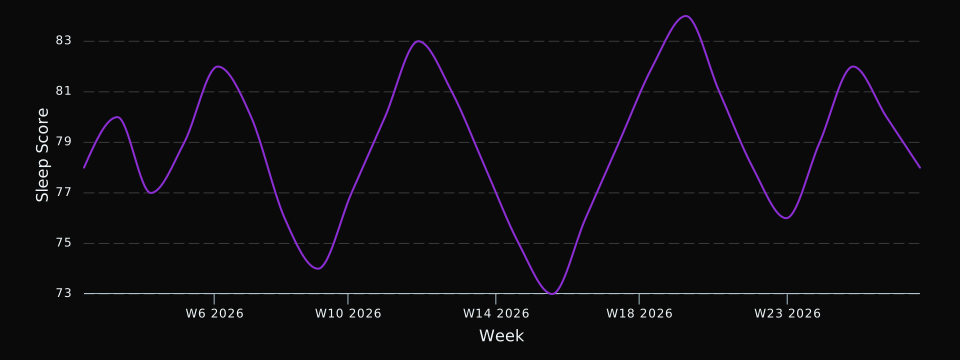
Sleep score by week
An example DayDash chart of Oura data, showing sleep score by week

Example chart rendered in DayDash. Sample data shown for illustration.

Your ring’s data, next to the rest of your day

Oura does a lot of work to turn a night’s raw signal into sleep, readiness and activity scores, and that daily summary is genuinely useful on its own.

DayDash’s job is to put those scores on the same timeline as everything else you track — your calendar, your spending, your screen time, the weather where you live — so you can look at them together rather than one app at a time.

Questions people explore with this

  • How do my readiness contributors move together across a month?
  • What does my sleep efficiency look like alongside my late-evening schedule?
  • Does my HRV trend track my training load?
  • How does my body temperature deviation move over a season?

Full V2 API coverage

DayDash syncs against Oura’s V2 API — daily summaries, detailed sleep periods, workouts, sessions and tags — and backfills your history, so your charts have something to show from the day you connect rather than starting from zero.

What you get

15 kinds of Oura data

Pick the ones you care about. Every field becomes something you can chart, filter, and compare against everything else you track.

Daily Sleep

Daily sleep summary with scores and detailed sleep metrics

Daily Activity

Daily activity summary with scores and activity metrics

Daily Readiness

Daily readiness score with detailed readiness contributors

Daily Stress

Daily stress with high stress and recovery time tracking

Daily SpO2

Daily blood oxygen saturation (SpO2) measurements and breathing analysis

Daily Resilience

Daily resilience metrics measuring stress recovery and adaptation

Daily Cardiovascular Age

Daily cardiovascular age assessment comparing vascular age to chronological age

Workouts

Individual workout sessions with detailed exercise metrics

Sleep Periods

Detailed sleep periods with sleep stages, heart rate, and HRV data

Heart Rate

Continuous heart rate measurements at 5-minute intervals

VO2 Max

VO2 max cardiovascular fitness measurements from workouts

Sessions

Guided and unguided wellness sessions with biometric data and mood tracking

Sleep Time Recommendations

AI-powered sleep optimization recommendations and optimal bedtime windows

Rest Mode Periods

Rest mode tracking periods with start/end times and episode details

Enhanced Tags

User-generated tags with timing, custom types, and detailed context for tracking personal events

How it works

1

Connect Oura

Authorize DayDash once. We pull your Oura history and keep it up to date.

2

Pick your fields

Choose only the data types you want. Nothing you don't select is ever synced.

3

Chart anything

Build dashboards that put Oura next to everything else you track — spending, sleep, screen time, the weather.

Worth knowing: Oura syncs your ring over Bluetooth when you open the Oura app, and DayDash reads from Oura's cloud after that. So a night only reaches your dashboard once you've opened Oura on your phone — if a day looks missing, that's usually why.

Your Oura data stays yours

DayDash is end-to-end encrypted. Your data is encrypted on your device with keys only you hold — we can't read it, and neither can anyone who gets our database.

Read how the encryption works

Ready to see your Oura data?

Join the beta and lock in $5/month, forever.

DayDash is not affiliated with, endorsed by, or sponsored by Oura. Oura and related marks are trademarks of their respective owners, used here only to describe what DayDash connects to.