
Build your own Fitbit dashboard
Steps, distance, calories, heart rate, and sleep from your Fitbit.
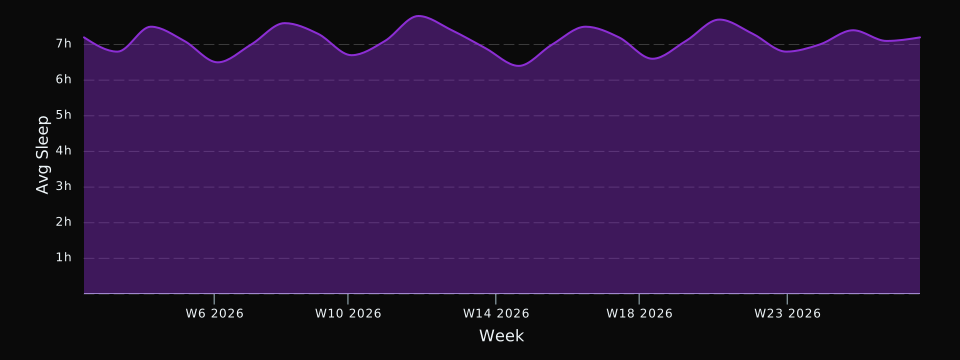
Example chart rendered in DayDash. Sample data shown for illustration.
What you get
24 kinds of Fitbit data
Pick the ones you care about. Every field becomes something you can chart, filter, and compare against everything else you track.
Activity & Fitness
Steps, distance, calories burned, active minutes, and daily activity metrics
Steps
Daily step count from your Fitbit device
Distance
Daily distance traveled from your Fitbit device
Calories Burned
Total daily calories burned including BMR and activity
Floors
Daily floors climbed from your Fitbit device
Active Zone Minutes
Daily active zone minutes earned from heart rate zones during activities
Sedentary Minutes
Daily minutes spent in sedentary activity
Lightly Active Minutes
Daily minutes spent in light activity
Fairly Active Minutes
Daily minutes spent in moderate activity
Very Active Minutes
Daily minutes spent in vigorous activity
Activity Calories
Daily calories burned from activity only (excludes BMR)
BMR Calories
Daily calories burned from basal metabolic rate (at rest)
Elevation
Daily elevation gained in meters
Vital Signs
Heart rate, HRV, SpO2, breathing rate, skin temperature, and cardio fitness score
Heart Rate
Daily heart rate summary including resting heart rate and heart rate zones
Heart Rate Variability
Daily HRV (RMSSD) measured during sleep - a key indicator of recovery and stress
Blood Oxygen (SpO2)
Blood oxygen saturation levels measured during sleep
Breathing Rate
Average breathing rate (breaths per minute) measured during sleep
Skin Temperature
Nightly skin temperature variation from your personal baseline (measured during sleep)
Cardio Fitness Score (VO2 Max)
Estimated VO2 Max - a measure of cardiovascular fitness (mL oxygen per kg per minute)
Sleep
Sleep duration, efficiency, stages, and quality metrics
Sleep
Detailed sleep logs including duration, efficiency, and sleep stages
Body Measurements
Weight, body fat percentage, and BMI measurements
Weight
Body weight measurements from Aria scales and manual entries
Body Fat
Body fat percentage measurements from Aria scales and manual entries
Nutrition & Hydration
Water intake and calorie consumption from food logging
Water Intake
Daily water consumption logged in the Fitbit app
Calories Consumed
Daily calorie intake from food logged in the Fitbit app
Workouts & Exercises
Recorded workouts, exercise sessions, and activity logs
Workouts
Recorded workouts and exercises including auto-detected activities
How it works
Connect Fitbit
Authorize DayDash once. We pull your Fitbit history and keep it up to date.
Pick your fields
Choose only the data types you want. Nothing you don't select is ever synced.
Chart anything
Build dashboards that put Fitbit next to everything else you track — spending, sleep, screen time, the weather.
Worth knowing: Fitbit syncs your tracker over Bluetooth when you open the Fitbit app, and DayDash reads from Fitbit's cloud after that. A day only reaches your dashboard once the Fitbit app has synced it.
Your Fitbit data stays yours
DayDash is encrypted with keys only you hold. Your data is encrypted before it's stored — we can't read it, and neither can anyone who gets our database.
Read how the encryption worksPair Fitbit with your other data





DayDash is not affiliated with, endorsed by, or sponsored by Fitbit. Fitbit and related marks are trademarks of their respective owners, used here only to describe what DayDash connects to.